Casio SE-C300 User's Manual
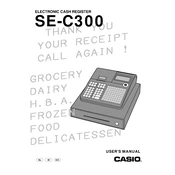
To perform a basic setup, first plug in the cash register and turn it on. Then, set the date and time by using the 'Mode' switch to navigate to the 'PGM' mode, and enter the current date and time using the numeric keypad.
To reset to factory settings, turn the key to the 'OFF' position, unplug the register, and hold down the 'CA' key while plugging it back in. Release the 'CA' key when the display shows "00000000".
To change the receipt paper, open the printer cover, remove the empty roll, and insert a new roll with the paper feeding from the bottom. Close the cover and press the 'Feed' button to advance the paper.
Enter 'PGM' mode using the mode switch, select 'PLU' programming, and input the desired PLU number followed by the item details. Confirm with the 'CA' key to save the changes.
If the drawer doesn't open, check for loose connections and ensure the register is plugged in. You can also use the emergency drawer release lever located beneath the register.
To print a sales report, turn the mode key to 'X' or 'Z' position, and press the 'CA' button. The register will print the report detailing sales data.
Turn the key to the 'PGM' mode and use the numeric keypad to navigate and change settings as needed. Press 'CA' to confirm each setting change.
Refer to the user manual for the specific error code. Most errors can be resolved by turning the register off and on again, or by checking for paper jams and loose connections.
The Casio SE-C300 does not support direct computer connectivity for data transfer. Reports need to be manually entered into a computer system.
Regularly clean the exterior with a soft, dry cloth, and ensure the paper path is free of dust and debris. Periodically check all connections and replace the receipt paper as needed.